Releases: pashkov256/deletor
✨ Deletor v1.5.0: Enhanced file management experience

🎉 Major Updates
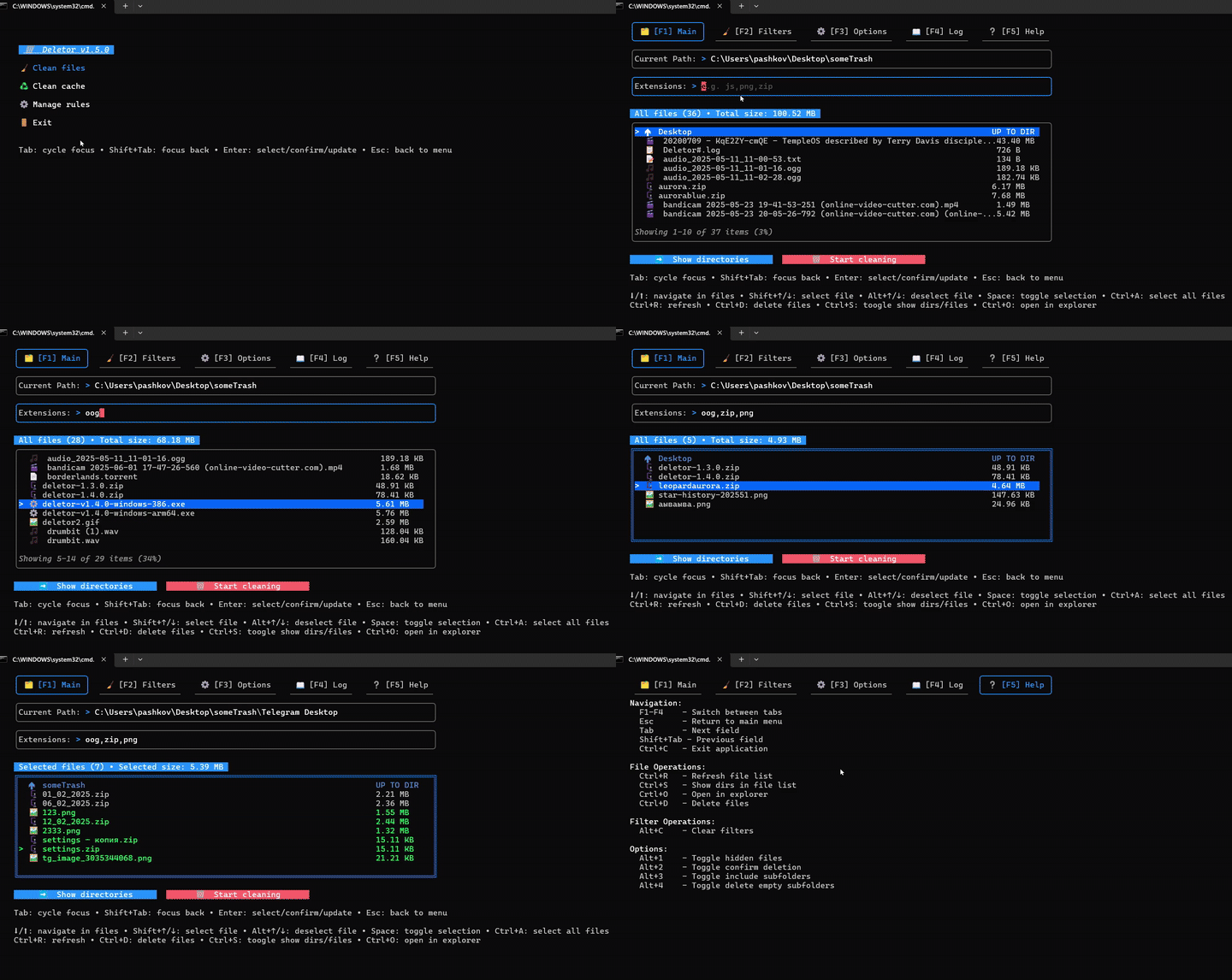
🖱️ Mouse Support
- Added mouse interaction support in TUI mode
- Click to focus any interactive element
- Powered by bubblezone
🎯 Multiple File Selection
- Implemented comprehensive file selection system
- Shift+Up/Down for range selection
- Ctrl+A for selecting all files
- Space to toggle selection
- Alt+Up/Down for deselection
- Ctrl+C to clear selection
- Visual indicators for selected files
🧪 Enhanced Testing Infrastructure
- Comprehensive test coverage across all packages:
- Rules package testing
- Clean files functionality
- Cache locations validation
- CLI runner verification
- Menu functionality
- Logging system
- File scanning (current level and recursive)
- Empty subfolders handling
- Time duration validation
🚀 CLI Enhancements
- New CLI features:
- Added
--trashflag for moving files to trash - Rules integration in CLI mode
- Optional extension handling
- Improved error handling for cache operations
- Added
🛠️ Code Quality & Maintenance
- Integrated golangci-lint for code quality
- Improved code documentation
- Refactored core components:
- New package runner implementation
- Enhanced file icon system
- Improved time validation
- Integrated validation package
- Better option navigation
🐛 Bug Fixes
- Fixed optional extension handling in CLI
- Resolved cache clearing error handling
- Improved file scanning reliability
- Enhanced menu navigation
🔗 Related PRs
- #189: Documentation improvements
- #191: Rules package unit tests
- #192: golangci-lint integration
- #196: CLI/TUI runner refactor
- #199: File icon system
- #201: Time validation
- #203: Validation package integration
- #209: Option navigation
- #217: Rules testing
- #220: Clean functionality testing
- #225: Cache location tests
- #232: Optional extension CLI
- #229: CLI runner tests
- #222: Menu testing
- #126: Logging tests
- #207: Time validation tests
- #239: Cache error handling
- #241: Mouse event support
- #184: File scanning tests
- #185: Recursive scanning tests
- #186: Empty folder tests
- #247: Multiple file selection
- #248: Trash flag support
- #249: CLI rules integration
🚀 Installation
go install github.com/pashkov256/deletor@v1.5.0🤝 Contributing
We welcome contributions! Please see our CONTRIBUTING.md for guidelines.
📜 License
This project is licensed under the MIT License - see the LICENSE file for details.
🛡️ Deletor v1.4.0: Take Control of Your Files
🎉 Major Updates
🗑️ System Cache Management
- Added system cache scanning and cleaning
- Windows cache support
- Linux cache support using Unix system calls

🚨 Enhanced error handling system
-
Implemented comprehensive error handling across all UI inputs
- Real-time validation with visual indicators
- Context-aware error messages
- Error state persistence between tabs
-
Improved error display:
- Visual indicators (red borders, icons)
- Automatic error clearing
-
Technical improvements:
- Centralized error handling
- Error type categorization
- Integration with logging system
- Non-blocking error display

📄 New Logging System
- Added comprehensive logging functionality
- New dedicated Log tab with real-time operation tracking
- Three new logging options:
- Log Operations: Track all file operations
- Log to File: Save logs to disk
- Show Statistics: Display operation metrics
- Enhanced error tracking and reporting

⏰ Enhanced time-based filtering
- Support for relative time ranges
- Better time range validation
🛠️ Technical Improvements
🎨 UI Enhancements
- Added new file list icons for better visual feedback
- Added CTRL+S shortcut for toggling directory/file view
- Enhanced tab navigation with arrow keys
- Improved help text organization
⚙️ CLI Improvements
- Added new CLI flags:
--max-size: Maximum file size filter--prune-empty: Remove empty directories--skip-confirm: Skip deletion confirmation--older: Filter files older than specified time--newer: Filter files newer than specified time
🧪 Testing & Quality
- Added comprehensive test infrastructure
- New internal/test folder structure
- Test suite for DeleteFiles function
- Enhanced filter testing
- Improved CI/CD pipeline with CodeCov integration
🐛 Bug Fixes
- Fixed file list update issues
- Improved rules initialization
- Enhanced input navigation
- Fixed space menu handling
- Resolved file locking issues
- Fixed Windows API compatibility
- Improved Linux support
🔗 Related PR
- #113: Installation fixes
- #114: Rules setup improvements
- #112: Log tab implementation
- #116: Logging options
- #117: File list icons
- #119: File size alignment
- #118: Directory view toggle
- #120: CTRL+S shortcut
- #121: CodeCov integration
- #123: Test infrastructure
- #128: Test organization
- #129: System cache management
- #137: Cache scanning
- #140: Linux cache support
- #141: Tab navigation
- #142: UI improvements
- #149: Max size flag
- #151: Error handling
- #152: Time filtering
- #156: Error system
- #158: Tab structure
- #162: Rules inputs
- #165: Options enhancement
- #167: Rules application
- #168: Empty dir pruning
- #169: Skip confirm
- #172: Emoji utils
- #175: Space menu
- #177: File list updates
- #179: Input navigation
- #181: File display
TUI mode

🚀 Installation
go install github.com/pashkov256/deletor@v1.4.0🤝 Contributing
We welcome contributions! Please see our CONTRIBUTING.md for guidelines.
📜 License
This project is licensed under the MIT License - see the LICENSE file for details.
💪 Deletor v1.3.0: Time to Delete Better!
🎉 Major Updates
🔄 Project Restructuring
- Implemented new modular architecture for better maintainability and scalability
- Core Module: Centralized business logic and common interfaces
- UI Module: Separated TUI and CLI components
- FS Module: Enhanced file system operations
- Rules Module: Improved rule management system
🗑️ Enhanced File Management
- Added Recycle Bin support
- Option to send files to OS Recycle Bin instead of permanent deletion
- Configurable deletion mode in Options tab
- Persistent deletion mode settings between sessions
- Visual indicator for current deletion mode
⏰ New Time-Based Filtering
- Added comprehensive time-based file filtering
- Filter files older than specified time
- Filter files newer than specified time
- Support for days, hours, and minutes
📏 Improved Size Filtering
- Enhanced size filtering capabilities
- Added maximum size filter in Filters tab
- Fixed 0-byte file detection in CLI mode
- Improved size input handling
🛠️ Technical Improvements
🎨 UI Enhancements
- Added keyboard shortcuts for UI navigation
- Quick focus switching between UI elements
- Improved keyboard accessibility
- Removed folder display from file list for cleaner interface
- Refactored TUI code for better maintainability
- Improved component organization
- Enhanced code readability
- Better separation of concerns
- Add emoji for options (👁️,
⚠️ ,📁,🗑️,♻️)
⚙️ CLI Improvements
- Added optional deletion confirmation for CLI mode
- Refactored mode initialization and execution flow
- Streamlined CLI and TUI initialization
- Improved error handling
- Better command flow management
🔗 Related Issues
- Closes #108: Add emoji for options
- Closes #98: Time-based filtering implementation
- Closes #97: Removed folder display from file list
- Closes #93: Added max size field in Filters tab
- Closes #91: TUI code refactoring
- Closes #88: Fixed 0-byte file detection
- Closes #86: Project restructuring
- Closes #85: Mode initialization refactoring
- Closes #81: Added max size input
- Closes #84: CLI deletion confirmation
- Closes #78: Added UI hotkeys
- Closes #61: Recycle Bin support
TUI MODE

🚀 Installation
go install github.com/pashkov256/deletor@v1.3.0📋 Usage Examples
TUI Mode with New Features
deletor- Use new keyboard shortcuts for navigation
- Configure deletion mode in Options tab
- Set time-based filters in Filters tab
- Use max size filter for precise file selection
CLI Mode with Enhanced Options
deletor -cli -d ~/Downloads -e mp4,zip --min-size 10mb -subdirs --exclude data,backup --confirm-delete🔧 Configuration
The new version includes enhanced configuration options:
- Deletion mode preference (Recycle Bin vs. permanent)
- Time-based filtering rules
- Size range filtering
- UI preferences
🤝 Contributing
We welcome contributions! Please see our CONTRIBUTING.md for guidelines.
📜 License
This project is licensed under the MIT License - see the LICENSE file for details.
🚀 What's NEW in Deletor v1.2.0
Major Features
- ✨ Completely redesigned TUI interface with tabbed navigation (Main, Filters, Options, Help)
- 🔄 New option to recursive file search and deletion capabilities with subfolder support in TUI mode
- 🗑️ New option to automatically delete empty subfolders after file cleanup
UI/UX Improvements
- 🎯 Streamlined path input - no need to specify path when launching TUI
- 📝 Added comprehensive hot keys documentation tab (Help)
New Hot Keys
- Alt+1: Toggle hidden files
- Alt+2: Toggle confirm deletion
- Alt+3: Toggle include subfolders
- Alt+4: Toggle delete empty subfolders
- Alt+C: Clear filters
- Ctrl+D: Delete files
Technical Improvements
- 🛠️ Added validations methods for inputs
- 🚀 Optimized file search and deletion processes
💡It is planned to add in the near future:
- filtering by file modification time, maximum size
- The ability to transfer files to recycle Bin
- JSON logging
And much more, some tasks are free and they are in the "issues" section,I will be glad if you contribute!
Tabbed navigation was necessary to make the interface look cleaner, and many more different filters are planned to be added.


Add menu in TUI, restore cli
Features Implemented:
- Enhanced File Explorer UI
- Compact and intuitive interface for browsing files and directories
- File types displayed with appropriate icons (images, documents, archives, etc.)
- Responsive navigation with arrow keys regardless of current focus
- Improved Statistics
- Display total size of selected/filtered files
- File count statistics for better space management
- Asynchronous size calculation with progress indication
- Optimization and Performance
- Non-blocking directory scanning for large directories
- Concurrent file processing with controlled resource usage
- Special handling for system directories to prevent lag
- User Experience Improvements
- Clear focus indicators for all interactive elements
- Streamlined keyboard navigation (Tab, Enter, Esc, arrow keys)
- Global keyboard shortcuts (Ctrl+R for refresh, Ctrl+D for directory view, etc.)
- Exit option added to main application menu

