

RIBsTreeMaker visualize RIBs business logic tree. The output style is org-mode mindmap.
swift run RIBsTreeMaker [path/to/iOSproject] --under [RIB name] [--format [plantUML or markdown (default: plantUML)]] [--summary] [--exclude [RIB name]]
- under: The tree will be displayed only under the RIB.
- format: Specify the output format. The format that can be specified is as follows:
- plantUML(Default): The output is in PlantUML format.
- markdown: The output is in Markdown list format..
- summary: The RIB's summary is displayed in the node. The summary is retrieved
// SUMMARY: RIB summaryfrom the Builder file. - exclude: The specified RIB and the RIB below it are not displayed. When specifying multiple RIB names, separate each RIB name with
,.
The output style is org-mode mindmap.
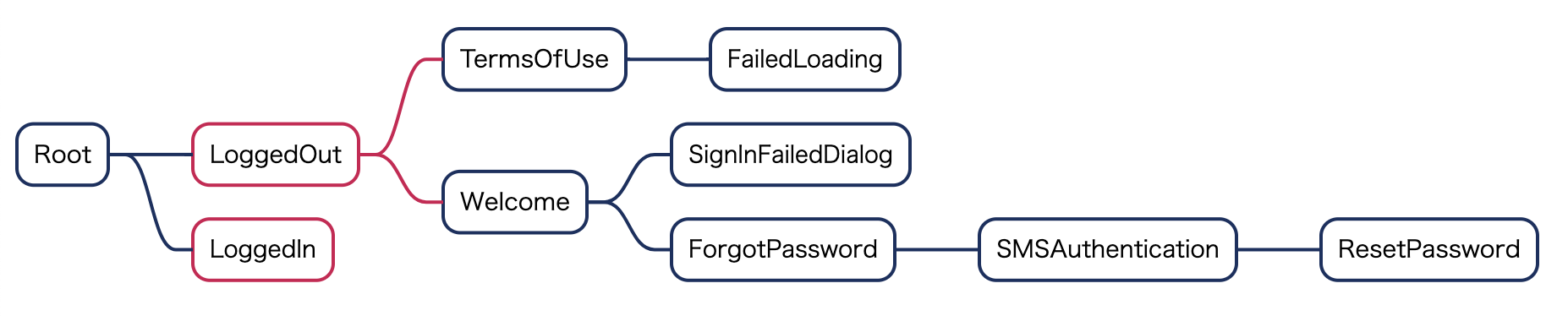
@startmindmap
* Root<<hasView>>
** LoggedOut
*** TermsOfUse<<hasView>>
**** FailedLoading<<hasView>>
*** Welcome<<hasView>>
**** SignInFailedDialog<<hasView>>
**** ForgotPassword<<hasView>>
***** SMSAuthentication<<hasView>>
****** ResetPassword<<hasView>>
** LoggedIn@endmindmap
@endmindmap
Additionally, the mindmap style is set to detect easily the RIB has own view or not.
<style>
mindmapDiagram {
  BackgroundColor translate
  LineColor #d20b52
  FontColor #d20b52
  RoundCorner 30
  LineThickness 2.0

  node {
    BackgroundColor #fff
  }

  arrow {
    LineColor #192f60
  }

  .hasView {
    LineColor #192f60
    FontColor #192f60
  }
}
</style>
For example, if use PlantUML the RIBs tree is visualized like the below.
RIBsTreeMaker is inspired by flock. Modified and adapted to RIBs architecture.