
An LSPosed / Xposed module that makes apps see no device-policy restrictions
on your own device. It hooks the client-side DevicePolicyManager and
UserManager restriction checks and returns the "no restriction" answer —
per category, behind a master toggle.
v3 is a full Kotlin rewrite and fork of liyafe1997/FuckDevicePolicy. The original neutralises
UserManagerpolicies (e.g. work-profile / Intune device-wide restrictions); this rewrite generalises that into a per-category UI spanningDevicePolicyManagerandUserManager.
Source, issues & builds: https://github.com/Bouteillepleine/FuckDevicePolicy
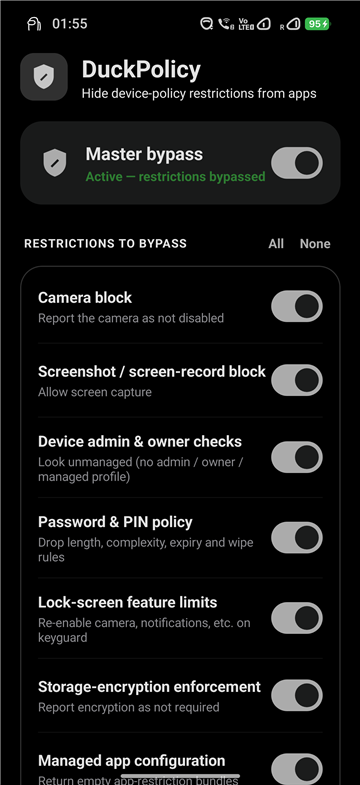
- Master toggle + per-category switches, with All / None quick actions.
- 12 categories:
- Camera block — report the camera as not disabled
- Screenshot / screen-record block — allow screen capture
- Device admin & owner checks — look unmanaged (no admin / owner / managed profile)
- Password & PIN policy — drop length, complexity, expiry and wipe rules
- Lock-screen feature limits — re-enable camera, notifications, etc. on keyguard
- Storage-encryption enforcement — report encryption as not required
- Managed app configuration — return empty app-restriction bundles
- User restrictions (
DISALLOW_*) — clear them, incl.UserManager.hasUserRestriction - Auto-lock timeout — remove the forced maximum time-to-lock
- Kiosk / lock-task mode — report lock-task as permitted / unrestricted
- Allowed IMEs & accessibility — remove input-method / accessibility allow-lists
- Misc — auto-time, cross-profile, Bluetooth and other smaller restrictions
- Material You dynamic colours (Android 12+) and an adaptive icon.
- Small: R8 + resource shrinking, ~1.8 MB.
- Install and enable DuckPolicy in LSPosed.
- Set the module scope:
- System Framework (
android) for the broadest, system-wide effect — the recommended default for work-profile / user-restriction cases. - or specific target app(s) whose policy view you want to change.
- System Framework (
- Reboot (or force-stop the scoped processes) to apply.
Important
Do not scope the MDM app itself (e.g. Microsoft Intune / Company Portal) — hooking it can expose Xposed/root to detection.
Settings are shared cross-process via XSharedPreferences, so enable the
module and reboot once before relying on the toggles — a freshly-installed,
not-yet-hooked app can't read them until then.
To see which restrictions are actually applied on your device:
adb shell dumpsys device_policy (look under userRestrictions:).
The hooks patch the client-side DevicePolicyManager / UserManager wrappers
inside each scoped process, changing what an app (or the framework) sees when it
queries policy. They do not rewrite what system_server actually enforces
underneath. Intended for your own device.
- Original module and concept: liyafe1997/FuckDevicePolicy.
- v3 rewrite: Bouteillepleine/FuckDevicePolicy.
该模块可以让 App 在你自己的设备上看到「没有任何设备策略限制」。它挂钩客户端的
DevicePolicyManager 与 UserManager 的限制检查,按类别返回「无限制」的结果,并带有一个总开关。
这些策略一般由「设备管理员」App 或「工作配置文件」设置(例如 Microsoft Intune),
即使在工作配置文件里设置、但会影响到整个安卓(你的个人空间)的全局策略也在覆盖范围内。
注意:挂钩改变的是各进程中客户端所「看到」的策略,并不会改变
system_server底层实际执行的策略。 请勿将 MDM App 本身(如 Intune / 公司门户)加入作用域。