The wizard workbench is a few things:
- A collection of PostHog-less apps and codebases for testing and experimenting with the PostHog Wizard
- A toolbox of scripts and utilities to help you analyze, debug, and inspect Wizard runs
- A workshop and target practice environment where you can run the full local development stack
A stable of test applications and codebases, with no PostHog installed, lives in /apps/<framework>/<app-name>.
apps/
└── next-js/
│   ├── 15-app-router-saas
│   ├── 15-app-router-todo
│   ├── 15-pages-router-saas
│   └── 15-pages-router-todo
└── react/
To add a new test app, create a directory under /apps.
The services/ directory is a toolbox for scripts and utilities to help with Wizard development.
services/
└── pr-evaluator/
└── wizard-run/
The workbench can run the entire Wizard stack in local development mode, with hot reload where supported. It uses mprocs to run all the repos defined in your .env file:
- Examples repo
- Wizard repo
- MCP repo (within PostHog monorepo)
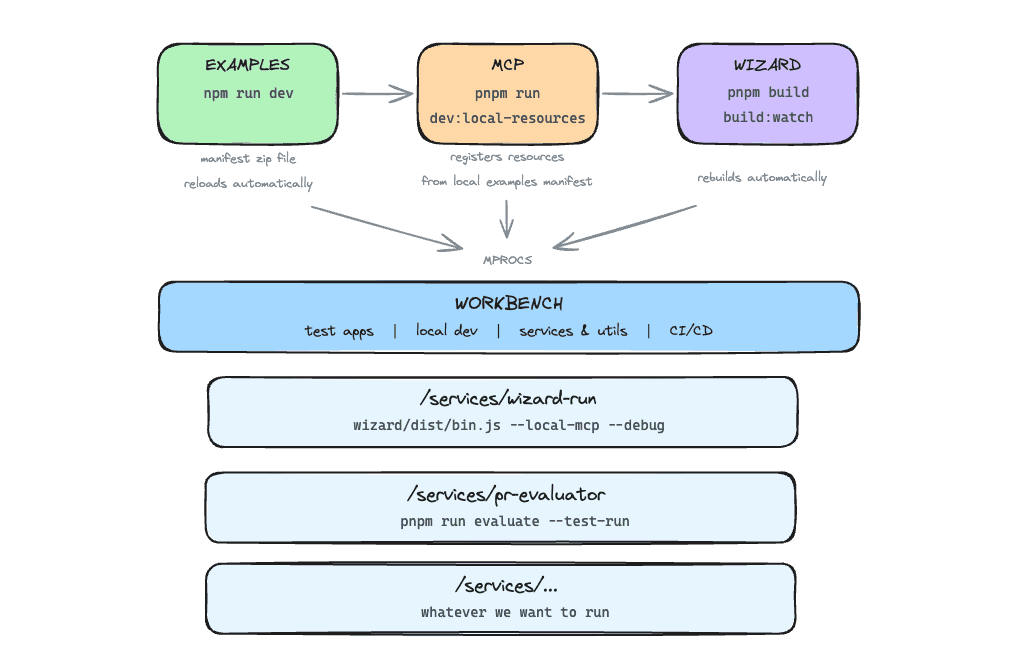
Install mprocs:
brew install mprocsInstall dependencies in this repo:
pnpm installCopy and edit .env with your repo paths and API key:
cp .env.example .envANTHROPIC_API_KEY=sk-ant-... # Required for wizard PR evaluator
# Adjust if your repos are in different locations
EXAMPLES_PATH=~/development/examples
MCP_PATH=~/development/posthog/products/mcp
WIZARD_PATH=~/development/wizardMake sure you've set up and installed dependencies for all required repos.
Enter mprocs to run the local dev stack:
mprocsThis starts 4 auto-running processes:
| Process | Description |
|---|---|
examples |
Examples server at localhost:8765 |
mcp |
MCP server at localhost:8787 |
mcp-inspector |
MCP inspector at localhost:6274 |
wizard |
Builds and watches Wizard for changes |
Manual processes (press s to start):
| Process | Description |
|---|---|
wizard-run |
Run the Wizard on a test app |
workbench-evaluate |
Evaluate a PR or branch's Wizard integration |