Build bootable macOS installer images without needing a Mac.
This project has two parts:
- A script (
mkmaciso) that uses only macOS built-in tools and commands to download and install the full macOS installer from Apple's servers into /Applications, and then creates bootable ISO/DMG images. - GitHub Action workflows that run
mkmacisoon Azure datacenter-hosted Mac minis if you don't have macOS.
Check Release page first - someone might've already built what you need. If not, see How to use to build your own.
Important
GitHub-hosted runners are a free public resource — please use them responsibly.
| ISO | DMG | |
|---|---|---|
| Best for | Virtual Machines | Bootable USB |
| VM Support | Attach as virtual DVD | Attach as virtual hard disk |
| Layout | Hybrid UDF/HFS | Raw GPT disk image |
ISO files - These work great for VMs (Proxmox, QEMU, VirtualBox, VMware). Just attach them like a virtual DVD. They'll even mount in Windows if you need to poke around inside.
DMG files - Flash these to a USB drive with Rufus (Windows), dd (Linux), or asr (macOS) to make bootable installation media. For VM use, convert them to .vhd (for Hyper-V) or .vmdk (for VMware) with qemu-img. QEMU/Proxmox can use the raw disk image without conversion.
Note: DMG files ship with a
.imgsuffix (e.g. macOS_Sequoia.dmg.img) so Rufus can find them without switching to "All files" in Explorer.
Pretty much everything from OS X Lion (10.7, 2011) through the latest macOS Tahoe (26, 2025). Full list:
Lion, Mountain Lion, Mavericks, Yosemite, El Capitan, Sierra, High Sierra, Mojave, Catalina, Big Sur, Monterey, Ventura, Sonoma, Sequoia, Tahoe.
Tip
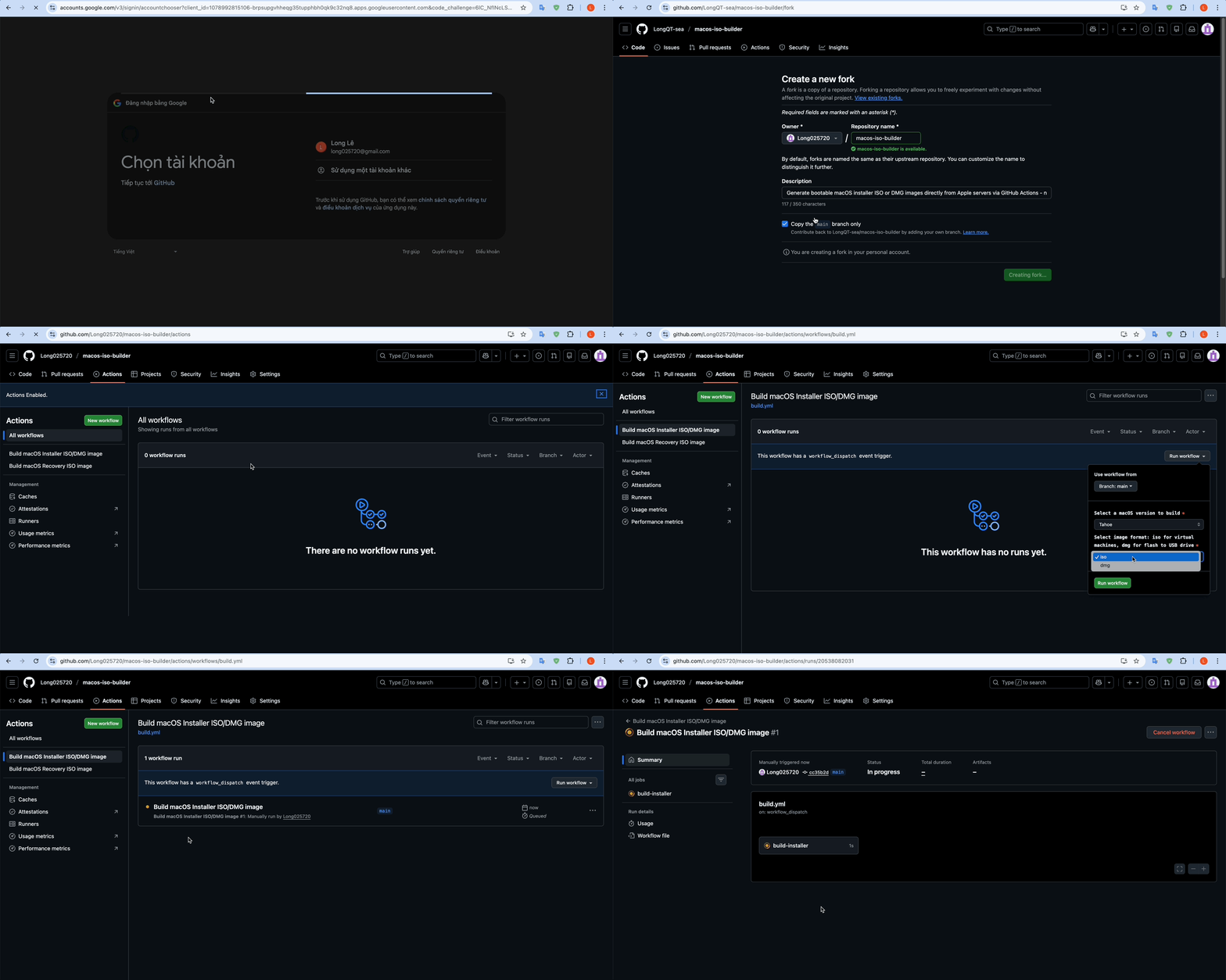
Click here to watch a visual guide (GIF)
-
Star and Fork this repository (requires a GitHub account).

-
Navigate to the Actions tab in your forked repository.
-
Click the green "I understand my workflows, go ahead and enable them" button.
-
Select a workflow from the left sidebar:
- Recovery ISO (recommended) - Small recovery image, builds in 2-5 minutes. Good for VMs.
- Full Installer - Complete offline installer, 5-18GB, takes 5-60 minutes to build.
-
Click the "Run workflow" button and configure the workflow inputs:
- macOS version – Choose a version (Sequoia, Sonoma, etc.).
- Image format – Choose
isofor virtual machines ordmgfor bootable USB drives.
-
Click the green "Run workflow" button to start the build, then wait for the workflow to complete.
Tip
If the run fails, just re-run the workflow.
- Once completed, reload the page and scroll down to the Artifacts section. Click the artifact link to start downloading (e.g.,
macOS_Sequoia_15.7.4.iso). - Recovery ISO artifacts are zipped — unzip before use.
Quick run using Terminal.app (change tahoe to whatever you want):
curl -s https://raw.githubusercontent.com/LongQT-sea/mkmaciso/main/mkmaciso | bash -s tahoeOr download the script first, then run with parameters:
curl -O https://raw.githubusercontent.com/LongQT-sea/mkmaciso/main/mkmaciso
chmod +x mkmaciso
./mkmaciso --help
Running ./mkmaciso without arguments gives you an interactive menu.
For VMs, just attach the ISO as a virtual CD drive. Proxmox users — if you want better performance, look into GPU passthrough. I have another repo (OpenCore-ISO) that might help with installation, and one for Intel iGPU passthrough specifically.
For bootable USB drives, after you flash the DMG there will be leftover space on the drive. You can use that to create a FAT32 partition for your EFI folder if you need one.
If you're using dd on Linux, triple-check your target device. dd doesn't ask for confirmation.
- macOS 10.9 or newer (11+ is better)
- Intel Mac recommended, Apple Silicon works but with some limitations
- 20-40GB of free space while building
- Internet connection
- sudo access
Apple for macOS and their update servers, Mavericks Forever for documenting the Mavericks recovery protocol, and the InsanelyMac community for their research on downloading macOS directly from Apple's catalog.
This tool downloads macOS images directly from Apple's official servers. Users are responsible for complying with Apple's Software License Agreement. macOS is a trademark of Apple Inc.
Licensed under GPLv3.

![@github-actions[bot]](https://avatars.githubusercontent.com/in/15368?s=64&v=4)