
This repository contains the source code for the AlmaLinux website at https://almalinux.org.
The site is built using the Hugo static site generator.
We welcome contributions for website updates, design improvements, and translations. Please follow the specific instructions provided for each contribution type:
- For blog content, see Contributing - Blog Posts
- For event pages, see Contributing - Event Pages
- For code or design improvements, see Contributing - Code and Design
- For translations, see Contributing - Translations
Event landing pages (AlmaLinux Day, ALDT, etc.) use the event-day Hugo layout. A new event page requires only two files — no HTML editing needed.
Create content/your-event-slug.md:
---
title: "AlmaLinux Day: City Year"
type: event-day
images:
  - /images/og/your-og-image.png

# Hero banner
hero_image: "/landingpages/your-event/hero.jpg"
event_name: "AlmaLinux Day: City"
event_tagline: "Optional tagline" # omit if not needed
event_date: "Month Nth, YYYY"
event_time: "HH:MM AM – HH:MM PM" # optional; shown below the date
venue:
  - "Venue Name"
  - "Street Address"
  - "City, Country"
venue_link: "https://maps-or-transit-link"
venue_link_text: "Getting here"
registration_url: "https://events.almalinux.org/e/your-event"
registration_cta: "Reserve your spot!"
registration_button: "al-cta-green" # or al-cta-blue

# Post-event — set to true and fill in after the event
post_event: false
thankyou_city: "City"
thankyou_quote: "Quote from benny after the event."
thankyou_youtube: "https://www.youtube.com/watch?v=..."

# Footer bars — omit either field to hide that bar
coc_url: "/p/your-event-code-of-conduct/"
photo_credit_name: "Photographer Name"
photo_credit_url: "https://unsplash.com/..."

# Must match the filename in data/events/ (without .yaml)
event_data_key: "your-event-slug"
speakers_header: "On stage at AlmaLinux Day: City" # optional; overrides default heading
---
The markdown body (below ---) is rendered between the hero and the speakers section. Use it for the event description, schedule embed, venue photos, and any other event-specific content. Raw HTML is supported.
Create data/events/your-event-slug.yaml:
event_sponsors:
  - name: "Sponsor Name"
    url: "https://sponsor.example.com"
    logo: "/brands/sponsor-logo.svg"
    size: "large" # "large" = prominent; omit for smaller display

speakers:
  - name: "Speaker Name"
    photo: "/landingpages/your-event/speaker.jpg"
    title: "Speaker Title or Talk Title" # optional
org: "Speaker Organization" # optional- Hero image →
static/landingpages/your-event/ - Speaker photos →
static/landingpages/your-event/(or anywhere understatic/) - OG/social preview image →
static/images/og/
Add the new event to layouts/partials/common/nav.html, inside the Events dropdown under the "Upcoming Events" header. Events are listed newest-first. Once the event has passed, move it under the "Past Events" header. Add a new <li>:
<li>
  <a
    class="dropdown-item"
    href="{{ "/your-event-slug/" | relLangURL }}"
    style="color:aliceblue">
    {{ i18n "ALD City YYYY" }}
  </a>
</li>Once the event is over, set post_event: true in the front matter and fill in thankyou_quote and thankyou_youtube. This automatically shows the thank-you block at the top of the page with a link to the recordings.
The foundation member sponsor logos are rendered automatically on every event page — you do not need to add them. To update the list, edit layouts/partials/common/foundation-members.html.
All development for the AlmaLinux website happens through this repository on GitHub.
Clear and detailed bug reports are incredibly valuable. A bug is a reproducible problem affecting the code or site functionality.
Please check the GitHub issues to see if your issue has already been reported. A good bug report should include as many details as possible to avoid unnecessary follow-ups.
- Search existing issues to see if the feature has already been requested. If so, give it a thumbs up or +1.
- If no similar request exists, open a new issue. Please clearly explain why the feature is needed and provide a detailed use case.
Before submitting code changes, please check if there are any open issues or pull requests that cover your proposal. If not, open an issue with a brief description and discuss it with the Marketing SIG first.
This helps avoid duplicated work and ensures proposed changes align with project goals.
For smaller contributions, follow this workflow:
- Create an issue describing your changes.
- Await confirmation from contributors.
- Fork the project.
- Create a new branch for your feature or bug fix.
- Add your code, documentation, etc.
- Submit a pull request (PR). All PRs should target the
mainbranch. Once approved, a development site will automatically generate based on the PR.
After review and approval, the changes will be merged into the main branch and deployed to the live site.
To set up a local development environment, you need the following installed:
- Hugo
Run hugo server to start a near-production local development instance.
After cloning, run npm install to install dependencies. This sets up the pre-commit hook (via husky) that automatically runs Prettier on staged files before each commit, keeping formatting consistent with CI.
Localization is important! Please include proper localization formatting in your PR. After formatting, run find_missing_i18n_strings.py and setup-pages-for-supported-languages.py, then commit the changes. If you encounter issues with these scripts, please open an issue with details.
To use a container-based development environment, install Docker and use an editor supporting the devcontainer standard. Details can be found in the README.
/layouts/— Hugo HTML templates/layouts/partial— Shared templates (header, footer, etc.)/i18n/— Localization and translation files/static/— Static files/content/— Markdown content for site pages/data/— Source data, currently only for the "Get AlmaLinux" pageconfig.yaml— Hugo configurationfind_missing_i18n_strings.py— Detects untranslated strings ini18n/en.jsonsetup-pages-for-supported-languages.py— Creates placeholder markdown pages for missing languages
The "Get AlmaLinux" page is dynamically generated using structured data and Hugo partial templates. This section explains how the data flows, which files are involved, and how to update the page for new releases or changes.
How it works:
-
Data sources:
data/get_almalinux_spec.yaml: Defines available AlmaLinux versions, supported architectures, and the configuration for each section (e.g., ISO, Cloud, Container).data/get_almalinux_checksums.yaml: Contains, for each version, the current highest point release (fullVersion) and the checksums for all artifacts (ISOs and cloud images) per architecture. This file can (and probably will) be generated.
-
Generation script:
- The script
tools/generate_get_almalinux_checksums.pyreadsdata/get_almalinux_spec.yaml, queries the CHECKSUM URLs defined for ISO and Cloud images, extracts the checksums and the current minor release and producesdata/get_almalinux_checksums.yaml. - The script
tools/generate_get_almalinux_yaml.pyreads both YAML files, merges their data, and producesdata/get_almalinux.yaml. This merged file is used by the Hugo partials to render the page. data/get_almalinux.yamlis not tracked in git. It is generated automatically by the GitHub CI workflow during site builds, but you must run the script manually for local development if you change the source YAML files.
- The script
-
Templates:
- Hugo partials in
layouts/partials/get-almalinux/render the page:tabs.html: Renders version tabs and architecture dropdowns.tab-content.html: Generates the content for each tab panel.arch-sections.html: Generates the page for each version+architecture combination.section-*.html: Renders each section (ISO, Cloud, Container, etc.) that makes up a full page.
- Hugo partials in
In most cases, you only need to update get_almalinux_checksums.yaml when a new point release is available.
- Run the checksum generation script to update
get_almalinux_checksums.yamlby looking at the source repos:python3 tools/generate_get_almalinux_checksums.py
- Optionally, run the generation script to see your changes locally:
This updates
python3 tools/generate_get_almalinux_yaml.py
data/get_almalinux.yamlfor use by Hugo. This will be done automatically by the Gitlab CI scripts during deployment. - Commit the resulting changes to
data/get_almalinux_checksums.yamland open a PR.
If you need to change which sections or architectures are shown, or adjust how URLs are generated, edit data/get_almalinux_spec.yaml:
- The YAML file contains a
commonblock, which sets default configuration for each section. These defaults are merged with per-version overrides in theversionsarray. - Each version entry includes:
id: The major version (e.g.,10,10-kitten).label: The tab title.arches: List of supported architectures (becomes dropdowns in the page).sections: List of sections to configure for that version.
- Each section (such as
isoorcloud) can inherit fromcommonbut may be overridden per version or architecture.- A section may have its own
archesarray to restrict it to certain architectures. For example, if cloud images for AlmaLinux 10 onppc64leare not supported, thecloudsection'sarchesarray should excludeppc64le. - To remove a section entirely for a version, omit it from the version's
sectionslist. - To remove a specific cloud image within the
cloudsection, define it with no content (see theocisection in 10-kitten as an example).
- A section may have its own
Most sections define URL templates for artifacts, using variables such as:
major: The major version, fromid(e.g.,10,10-kitten).full: The full version, fromfullVersioninget_almalinux_checksums.yaml(e.g.,10.1). IffullVersionis not set, it falls back toid.arch: The architecture (e.g.,x86_64,x86_64_v2).
Some URLs may allow other variables (like variant), or require different patterns per architecture (e.g., vagrant's registryUrls). For advanced options, consult the code in tools/generate_get_almalinux_yaml.py.
- Edit
get_almalinux_checksums.yamlfor new point releases, orget_almalinux_spec.yamlfor section/architecture changes. - Run the generation script to update the merged YAML:
python3 tools/generate_get_almalinux_yaml.py
- Start or restart the Hugo server to see your changes locally.
If you have questions about advanced configuration or variable support, refer to the script or open an issue for help.
Sometimes, prettier will fail with very unhelpful errors, such as:
[error] layouts/almalinux-day-tokyo-2026/single.html: Error: An error occured during printing. Found invalid node root.
[error]     at Object.print (/home/runner/work/almalinux.org/almalinux.org/node_modules/prettier-plugin-go-template/lib/index.js:65:19)
[error]     at callPluginPrintFunction (file:///home/runner/work/almalinux.org/almalinux.org/node_modules/prettier/index.mjs:16929:20)
[error]     at printAstToDoc (file:///home/runner/work/almalinux.org/almalinux.org/node_modules/prettier/index.mjs:16876:22)
[error]     at async coreFormat (file:///home/runner/work/almalinux.org/almalinux.org/node_modules/prettier/index.mjs:17294:14)
[error]     at async formatWithCursor (file:///home/runner/work/almalinux.org/almalinux.org/node_modules/prettier/index.mjs:17504:14)
[error]     at async formatFiles (file:///home/runner/work/almalinux.org/almalinux.org/node_modules/prettier/internal/legacy-cli.mjs:4279:18)
[error]     at async main (file:///home/runner/work/almalinux.org/almalinux.org/node_modules/prettier/internal/legacy-cli.mjs:4698:5)
[error]     at async Module.run (file:///home/runner/work/almalinux.org/almalinux.org/node_modules/prettier/internal/legacy-cli.mjs:4641:5)
The real error is being hidden by the go-template plugin, so the best way of figuring out what the problem is is by disabling it temporarily.
In your local checkout, edit .prettierrc and edit it so go-template isn't applied. For example, by changing the like this:
{
  "bracketSameLine": true,
  "plugins": ["prettier-plugin-go-template"],
  "overrides": [
    {
      "files": ["*.html-not-today-my-friend"],
      "options": {
        "parser": "go-template"
      }
    }
  ]
}
With that change done, you'll now get a different error when you run prettier locally:
> prettier layouts/almalinux-day-tokyo-2026/single.html
layouts/almalinux-day-tokyo-2026/single.html
[error] layouts/almalinux-day-tokyo-2026/single.html: SyntaxError: Unexpected closing tag "section". It may happen when the tag has already been closed by another tag. For more info see https://www.w3.org/TR/html5/syntax.html#closing-elements-that-have-implied-end-tags (858:7)
[error]   856 |         </div>
[error]   857 | end Attribution block -->
[error] > 858 |       </section>
[error]       |       ^^^^^^^^^^
[error]   859 |     </div>
[error]   860 |   </section>
[error]   861 | {{ end }}
Still not a great error, but it's better than before. In this particular case, you now know that section was already closed so the HTML is malformed somehow. Sometimes it's relatively easy to spot how because the offending tag is nearby, sometimes it's not. In this particular example, there were two unclosed divs in line 148, so it was NOT easy to spot. AI is remarkibly good at parsing HTML and actually giving you a better error than prettier, so you can give it the file and the prettier error and ask it to find the error.
Once you figure out the issue and fix it, undo your changes to .prettierrc and run it on the file again to verify that it's all good.
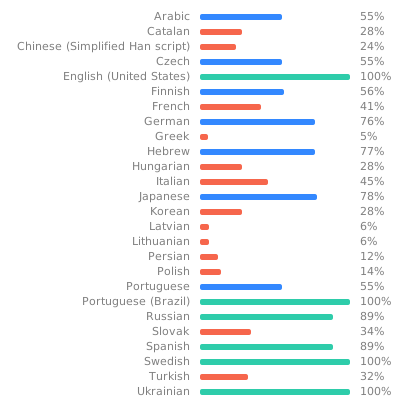
AlmaLinux.org translations are managed on Weblate. To contribute, join the AlmaLinux project on Weblate. Submissions through Weblate generate automated PRs to this repo, which are reviewed and merged by the Marketing SIG or another team lead.
For translation guidelines, see our Wiki.
To request a new language, open an issue in GitHub issues.

- Minor or cosmetic changes (typos, small style tweaks) can be reviewed and approved by any contributor with merge rights.
- Non-cosmetic changes require approval from the Marketing Lead.
- Weblate automatically submits PRs for translated strings; these are reviewed and merged by the Marketing SIG or team leads.