
Transform text into beautiful speech with Google's premium Chirp 3 HD voices


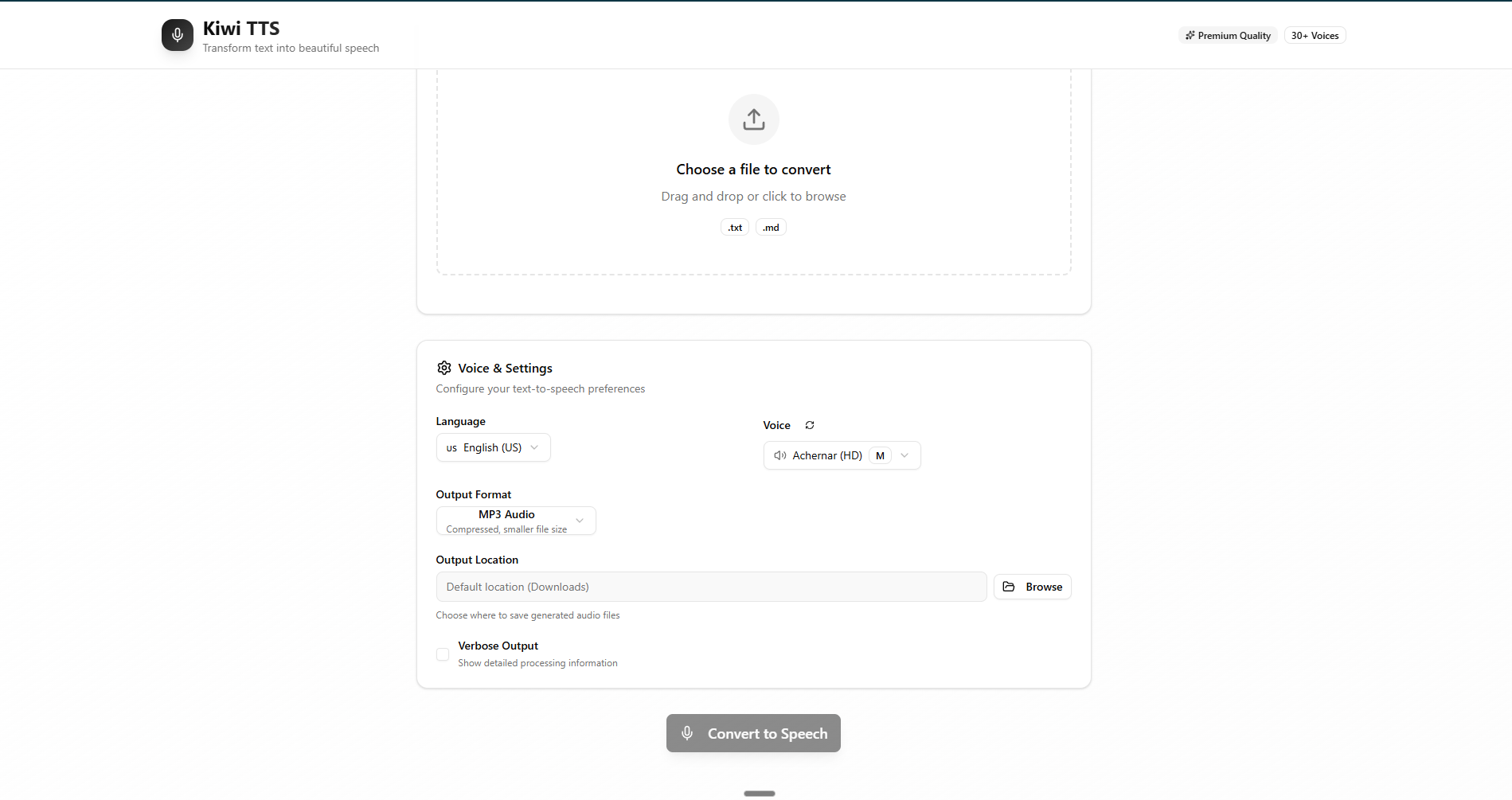
🎤 Professional Text-to-Speech with 30+ Premium Voices and Intuitive Interface
# 🖥️ Start the beautiful desktop experience
cd gui && npm run tauri dev

# ⚡ Use the powerful CLI
uv run kiwi document.md --voice en-US-Chirp3-HD-Kore

# 🌐 Launch the REST API server
uv run kiwi server --reload
Multi-Interface Features:
- 🖥️ Modern Desktop GUI - Beautiful Tauri app with drag-and-drop support
- 🎤 30+ Premium Voices - Google Chirp 3 HD voices across 28 languages
- 📁 Smart File Management - Custom output locations with OS integration
- ⚡ Lightning Fast - Optimized HTTP architecture for instant response
- 📊 Real-time Progress - Live conversion updates and audio preview
- 🔄 Format Flexibility - MP3 (24kHz) and WAV output formats
- 🎯 Developer Friendly - Full REST API with OpenAPI documentation
- 🏗️ Multi-tier Architecture - Clean separation of concerns across layers
- 🔒 Type Safety Everywhere - TypeScript, Python hints, Rust memory safety
- ⚡ Performance Optimized - HTTP keep-alive, connection pooling, lazy loading
- 🌍 Cross-Platform Native - Windows, macOS, Linux with native performance
- 📝 Advanced Text Processing - Markdown support with front matter parsing
- 🎨 Beautiful UI/UX - Modern React + shadcn/ui components
- 🔧 Developer Experience - Hot reload, comprehensive testing, clean APIs
- 📊 Production Ready - Error handling, logging, monitoring capabilities
# Clone the repository
git clone https://github.com/Abdulrahman-Elsmmany/kiwi.git
cd kiwi

# Install Python dependencies with UV (ultrafast)
uv sync

# Install GUI dependencies
cd gui && npm install# 🔑 Authenticate with Google Cloud
gcloud auth login
gcloud auth application-default login
# 🎤 Enable Text-to-Speech API
gcloud services enable texttospeech.googleapis.com
# 🎯 Set your project
gcloud config set project YOUR_PROJECT_ID# 🖥️ Launch the desktop app (recommended)
# Terminal 1: Start API server
uv run kiwi server
# Terminal 2: Launch GUI
cd gui && npm run tauri dev
# ⚡ Or use CLI directly
uv run kiwi document.md --voice en-US-Chirp3-HD-Kore
|
|
|
|
// Beautiful component architecture
<FileUpload onFileSelect={handleFile} />
<VoiceSettings language="en-US" voice={selectedVoice} />
<ConversionProgress status={conversionStatus} />
<AudioResult audioUrl={resultUrl} /># 📄 Convert a markdown file
uv run kiwi README.md
# 🎤 Use a specific voice
uv run kiwi document.txt --voice en-US-Chirp3-HD-Zephyr
# 📁 Custom output location
uv run kiwi file.md --output ~/Desktop/speech.mp3
# 📋 List all available voices
uv run kiwi voices --language en-US
# 🔊 Generate WAV format
uv run kiwi text.txt --format wav# 📤 Upload and convert file
curl -X POST "http://localhost:8000/api/convert" \
-F "file=@document.md" \
-F "voice=en-US-Chirp3-HD-Kore" \
-F "format=MP3"
# 📋 Get available voices
curl "http://localhost:8000/api/voices?language=en-US"
# 📊 Check API health
curl "http://localhost:8000/health"graph TB
subgraph "🖥️ Presentation Layer"
GUI[Desktop GUI<br/>React + TypeScript]
CLI[CLI Interface<br/>Click + Rich]
API[REST API<br/>FastAPI + OpenAPI]
end
subgraph "🔧 Application Layer"
HANDLER[Request Handlers<br/>Validation + Orchestration]
SERVICE[Business Logic<br/>Text Processing + Conversion]
end
subgraph "🎤 Infrastructure Layer"
TTS[Google TTS Client<br/>Chirp 3 HD Voices]
STORAGE[File Management<br/>Cross-platform I/O]
HTTP[HTTP Client<br/>Reqwest + Tokio]
end
GUI --> HTTP
CLI --> SERVICE
API --> HANDLER
HTTP --> API
HANDLER --> SERVICE
SERVICE --> TTS
SERVICE --> STORAGE
style GUI fill:#e3f2fd
style CLI fill:#f3e5f5
style API fill:#fff3e0
style HANDLER fill:#e8f5e9
style SERVICE fill:#fce4ec
style TTS fill:#e1f5fe
| Language | Voices Available | Popular Choices |
|---|---|---|
| 🇺🇸 English (US) | 8 voices | Kore (Warm), Zephyr (Dynamic), Achernar (News) |
| 🇬🇧 English (UK) | 4 voices | Hera (Refined), Oberon (Classic) |
| 🇫🇷 French | 3 voices | Sylvie (Elegant), Pierre (Professional) |
| 🇩🇪 German | 3 voices | Klaus (Authoritative), Emma (Friendly) |
| 🇪🇸 Spanish | 4 voices | Carmen (Expressive), Miguel (Clear) |
| 🇯🇵 Japanese | 2 voices | Yuki (Gentle), Haruto (Professional) |
| 🇰🇷 Korean | 2 voices | Min-ji (Warm), Jun-ho (Clear) |
| And 21 more languages! | 30+ total | Run uv run kiwi voices for full list |
kiwi/
├── 🐍 src/kiwi/              # Python Backend
│   ├── __init__.py           # Package initialization
│   ├── main.py               # CLI with Click framework
│   ├── api.py                # FastAPI REST server
│   ├── tts.py                # Google Cloud TTS client
│   ├── parsers.py            # Text/Markdown processing
│   └── utils.py              # Shared utilities
│
├── 🖥️ gui/                   # Tauri Desktop App
│   ├── src/                  # React Frontend
│   │   ├── App.tsx           # Main application
│   │   ├── components/       # UI Components
│   │   │   ├── ui/           # shadcn/ui components
│   │   │   └── *.tsx         # Feature components
│   │   └── lib/              # Utilities & hooks
│   │
│   ├── src-tauri/            # Rust Backend
│   │   ├── src/
│   │   │   ├── lib.rs        # Tauri commands
│   │   │   └── main.rs       # Application entry
│   │   └── Cargo.toml        # Rust dependencies
│   │
│   └── package.json          # Node dependencies
│
├── 🧪 tests/                 # Test Suite
│   ├── unit/                 # Unit tests
│   ├── integration/          # Integration tests
│   └── fixtures/             # Test data
│
├── 📚 docs/                  # Documentation
├── 🔧 pyproject.toml         # Python config
└── 📋 PLANNING.md            # Architecture docs
- Async Everything - Non-blocking I/O throughout the stack
- Connection Pooling - Reuse HTTP connections for speed
- Lazy Loading - Load resources only when needed
- Error Boundaries - Graceful error handling at every level
- Type Safety - Full typing in Python, TypeScript, and Rust
- Memory Efficiency - Stream large files, minimize allocations
- Cross-platform - Native performance on all platforms
# 🐍 Python Testing
uv run pytest                        # Run all tests
uv run pytest --cov=kiwi            # With coverage
uv run ruff check src/ tests/       # Lint code
uv run mypy src/                    # Type checking

# 🖥️ Frontend Testing
cd gui && npm run test              # Run tests
cd gui && npm run lint              # ESLint
cd gui && npm run type-check        # TypeScript

# 🦀 Rust Testing
cd gui/src-tauri && cargo test      # Run tests
cd gui/src-tauri && cargo clippy # Lint# 📦 Build Python package
uv build
# 🖥️ Build desktop app
cd gui && npm run tauri build
# 🐳 Build Docker image
docker build -t kiwi-tts .
# 🚀 Production deployment
uv run kiwi server --host 0.0.0.0 --port 8000- ✅ Batch file processing with queue management
- ✅ SSML support for advanced speech control
- ✅ Audio post-processing (speed, pitch control)
- ✅ WebSocket support for real-time streaming
- 📋 Web application version
- 📋 Mobile apps (iOS/Android)
- 📋 Voice cloning capabilities
- 📋 Multi-cloud support (AWS Polly, Azure Speech)
- 📋 AI-powered voice selection
- 📋 Collaborative workspaces
- 📋 Plugin ecosystem
- 📋 Analytics dashboard
This project showcases expertise in:
- ⚛️ Modern React patterns with hooks and context
- 📘 TypeScript for bulletproof type safety
- 🎨 Beautiful UI with shadcn/ui components
- 📱 Responsive design with Tailwind CSS
- ⚡ Performance optimization techniques
- 🐍 Async Python with FastAPI
- 🔒 Secure API design with validation
- 📊 RESTful architecture patterns
- 🧪 Comprehensive testing strategies
- 📈 Performance monitoring and optimization
- 🦀 Rust for system-level performance
- 🖥️ Cross-platform native applications
- 🔌 IPC communication patterns
- 📁 Native file system integration
- 🎯 OS-specific optimizations
- 🐳 Containerization with Docker
- 🔧 Modern build tools (uv, Vite, Cargo)
- 🧪 CI/CD pipeline design
- 📊 Monitoring and observability
- 🚀 Production deployment strategies
- ☁️ Google Cloud Platform expertise
- 🔐 Secure authentication flows
- 📈 API rate limiting and quotas
- 🔄 Retry strategies and resilience
- 💰 Cost optimization techniques
We welcome contributions! See our Contributing Guide for details.
# 1. Fork the repository
# 2. Create your feature branch
git checkout -b feature/amazing-feature

# 3. Make your changes and test
uv run pytest

# 4. Commit with conventional commits
git commit -m "feat: add amazing feature"

# 5. Push and create a Pull Request
git push origin feature/amazing-feature


This project is licensed under the MIT License - see the LICENSE file for details.
Acknowledgments:
- 🎤 Google Cloud for premium Chirp 3 HD voices
- 🖥️ Tauri Team for the amazing desktop framework
- ⚡ FastAPI for the modern Python web framework
- 🎨 shadcn/ui for beautiful React components
- 🚀 uv for ultrafast Python package management
Transform Text into Beautiful Speech
Created with ❤️ by Abdulrahman Elsmmany


⭐ Star this repository if KIWI TTS helps you create amazing audio content!
Let's transform text into speech together 🚀