Guide
Welcome to kcanvas guide. This guide contains general information about kcanvas library,
how to build it, setup project to use library and overall concepts.
kcanvas library source comes with CMake project included.
Currently only Windows and Linux builds available
You need CMake installed on your system to be able to generate Visual Studio solution or makefile to build kcanvas library.
Create new directory where you want to download kcanvas library source. For this example
let this directory be named example:
mkdir example
cd example
Clone kcanvas repository:
git clone https://github.com/livingcreative/kcanvas.git kcanvas
Clone kcommon repository, by default kcanvas depends on kcommon headers:
git clone https://github.com/livingcreative/kcommon.git kcommon
Now you can create directory for build (it can be located anywhere you like, for current
example it'll be inside our example directory) and generate project files for build
(for Windows you'll get Visual Studio solution by default, for Linux you'll get makefile):
mkdir build
cd build
cmake ../kcanvas/src
After running cmake you can open kcanvas.sln solution file and build it with Visual Studio
or msbuild. Resulting library files (kcanvas.lib) will be put under
lib\<Platform>\<Configuration> subdirectory inside kcanvas source directory.
By default kcanvas library builds with static MSVC runtime, to generate solution with dynamic
MSVC runtime you can pass following option to cmake: -Dmsvcruntime=dynamic
Please note, that on Linux kcanvas depends on Cairo graphics library (which is also part of
GTK+) so you need some of this to be present in system. After running cmake you can use generated
makefile for building library. Resulting library files (libkcanvas.a) will be put under
lib subdirectory inside kcanvas source directory.
In order to use kcanvas library in your project you need to proper configure include and library paths.
Two include paths should be added to project: one for kcanvas API headers (which are located
under kcanvas/include directory) and one for kcommon headers (which are located under
kcommon/include directory), kcanvas headers use kcommon headers by default.
This assumes that
kcommonrepository is clonned tokcommondirectory andkcanvasrepository is clonned tokcanvasdirectory
One library path should be added to project - path to directory where kcanvas static library
binary located. By default this is kcanvas/lib directory.
libdirectory also may contain other subdirectories for different platforms and build configurations
And finally, kcanvas library should be added to linker input. On Windows platform it's named
kcanvas.lib, on Linux it's named libkcanvas.a (keep in mind that on Linux linker
automatically adds lib prefix and .a suffix to given library name).
Having that setup you can include canvas.h header to get all kcanvas stuff in your code. All
kcanvas API declarations are wrapped into k_canvas namespace.
#include "kcanvas/canvas.h"You can avoid typing
kcanvas/for include directive if you add full path (kcanvas/include/kcanvas) to project configuration. However, to avoid possible collisions with other includes this is not recommended
This section will describe kcanvas API concepts in general.
Content will be added soon
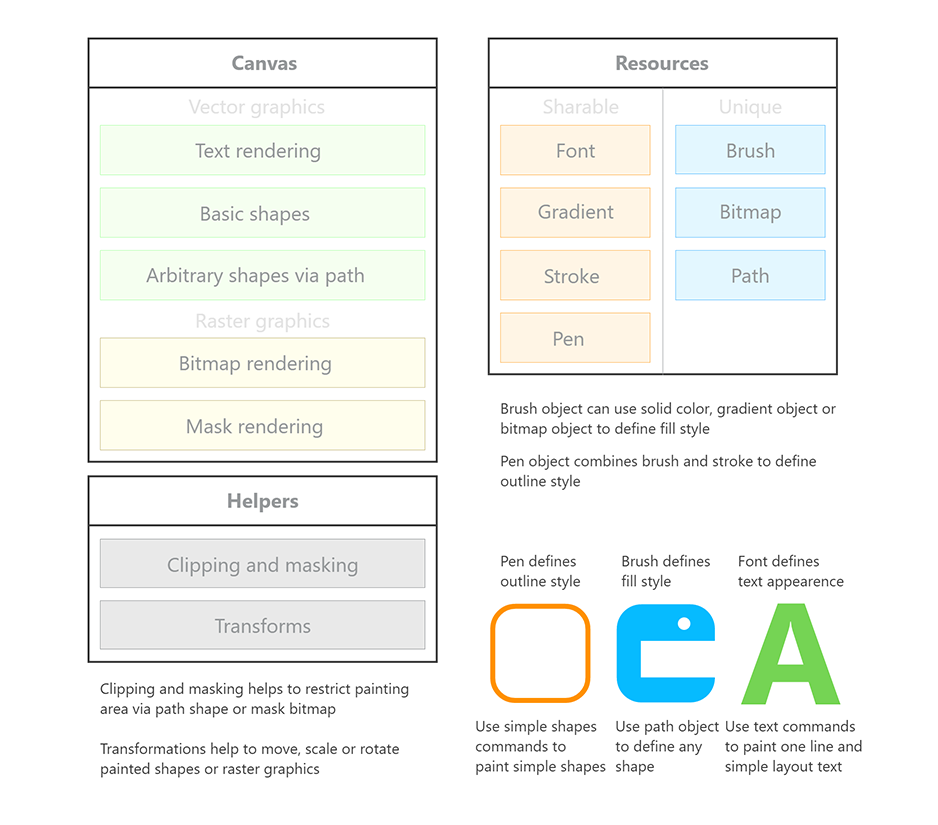
Canvas API concept diagram:
This section will describe canvas concept.
Content will be added soon
This section will describe vector graphics in kcanvas.
Content will be added soon
This section will describe raster graphics in kcanvas.
Content will be added soon
This section will describe concepts of filled shapes.
Content will be added soon
This section will describe concepts of shapes outlining.
Content will be added soon
This section will describe concepts of text rendering and measurment.
Content will be added soon